← Central do Criador · Guias de Recursos
📇 Saiba exatamente com quem você está falando. Gastos, status, suas anotações particulares — tudo ali no chat. Trate cada fã como seu VIP. ♡
O que é
Fan CRM é um painel de insights integrado às suas mensagens. Sem sair de uma conversa, você pode ver quem é cada fã, como ele gasta, onde ele está em sua assinatura e tudo o que você anotou sobre ele — para que cada mensagem que você envie seja informada. É 100% particular para você: os fãs nunca o veem nem sabem que existe.
Ele exibe cinco informações: quem eles são, os(as) marcadores de status, um resumo de gastos, os(as) linha do tempo de assinatura, seu notas, e as listas eles estão.
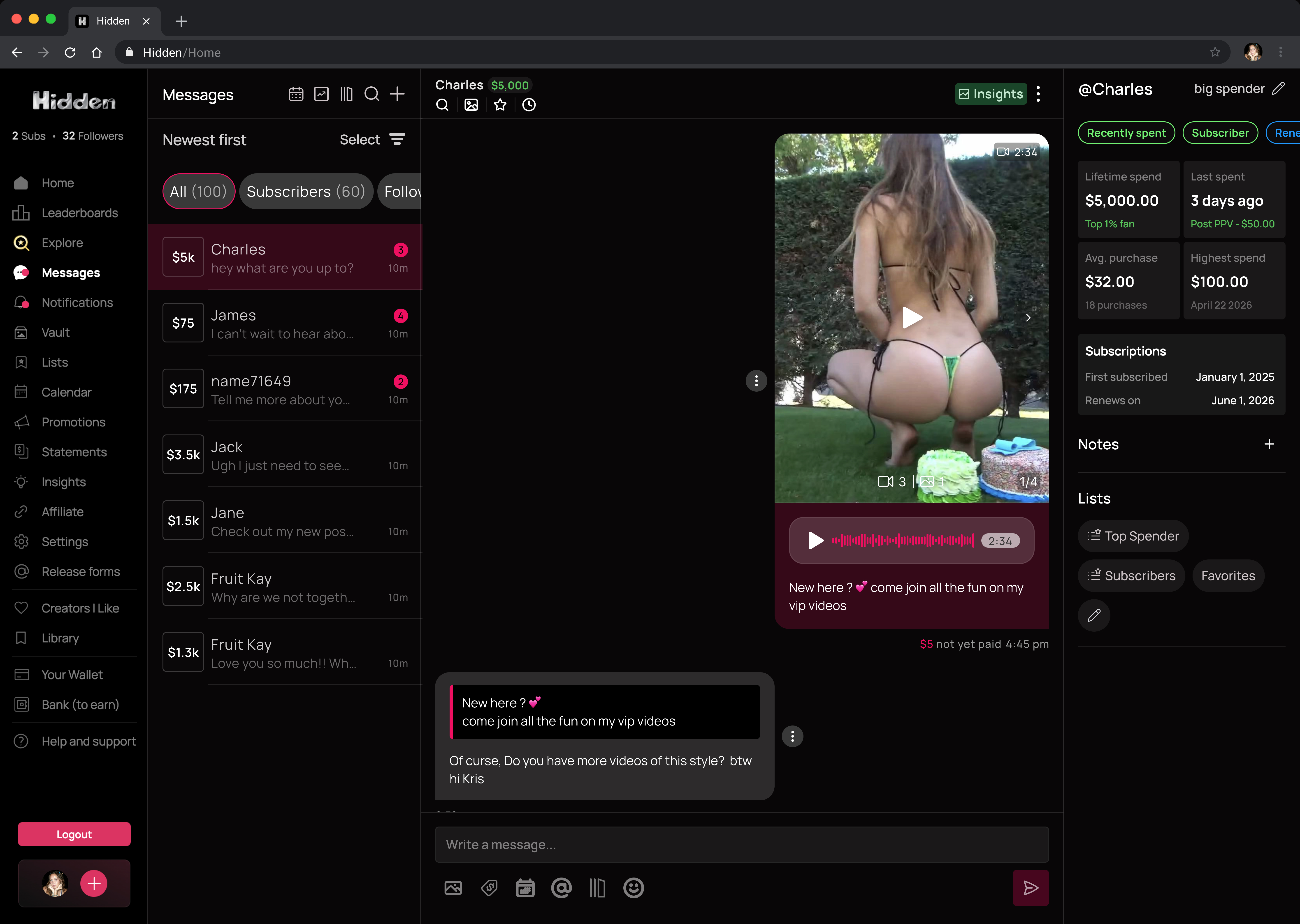
Onde encontrar
- Desktop — está sempre lá, como um painel no lado direito da sua conversa.
- Celular — toque no verde Insights botão no cabeçalho do chat e ele desliza do topo
A cabeçalho do chat também mostra o nome do fã (ou seu apelido para ele) e o gasto total vitalício
Quem é
- O painel mostra o @username do fã no topo.
- Adicione um apelido (o nome real dele, um lembrete — o que ajudar). Seu apelido então substitui o username dele em todos os lugares onde você o você vir — caixa de entrada, listas, notificações — mas nunca em extratos financeiros. Limpe-o a qualquer momento para voltar ao @username dele.
Tags de status
As tags são atribuídas automaticamente com base no comportamento real de cada fã com vocêvocê, e são codificadas por cores para que você possa entender um fã rapidamente:
🟢 positivo · 🔵 estável · 🟡 neutro / desconhecido · 🔴 precisa de atenção
Ele é assinante? (cada fã se encaixa exatamente em uma destas categorias)
| Tag | Significa |
|---|---|
| 🟢 Assinante | Assinatura ativa no momento |
| 🔴 Expirado | Foi assinante, agora expirou |
| 🟡 Nunca assinou | Nunca assinou para você |
Eles vão renovar? (mostra apenas para assinantes)
| Tag | Significa |
|---|---|
| 🔵 Renovar em | Renova automaticamente — não cancelou |
| 🔴 Renovar desativado | Cancelou — mantém acesso até o fim do ciclo, depois expira(risco de churn!) |
Como eles estão gastando? (no máximo um)
| Tag | Significa |
|---|---|
| 🟢 Gastou recentemente | Uma gorjeta / PPV / compra na loja nas últimas 48 horas |
| 🔴 Gasta pouco | Gastou antes, mas nada nos últimos 30 dias (esfriando) |
| 🟡 Nunca gastou | Nunca pagou nada a você — nunca (testes grátis não contam) |
| (sem tag) | Um assinante que nunca comprou extras, ou cujo último extra foi há 2–30 dias |
Panorama de gastos
Quatro blocos fornecem uma visão financeira para este fã com você (nunca na plataforma inteira):
- Gasto vitalício — tudo o que já gastaram com você (assinaturas, gorjetas, PPV, loja), com um percentil como "Top 15% dos seus fãs." (O percentil aparece quando você tem mais de 10 fãs pagantes.)
- Último gasto — há quanto tempo foi o último presente/PPV/compra na loja, e qual foi.
- Média de compra — a média das compras extras deles, e quantas foram feitas.
- Maior gasto — a maior compra extra individual deles, e a data.
Os últimos três blocos contam apenas gastos discricionários — presentes, PPV e loja. Cobranças de assinatura e renovações automáticas não contam para eles (mas contam no Gasto total).
Histórico de assinatura
Uma pequena seção de Assinaturas (sempre visível) mostra a você:
- Primeira assinatura — quando eles assinaram você pela primeira vez.
- Renova em / Expira em — para assinantes ativos: "Renova em" se estiverem renovando automaticamente, "Expira em" se cancelaram. Fãs expirados ou nunca assinantes mostram um traço.
Notas
Seu caderno particular sobre cada fã:
- Toque em + para adicionar uma nota (até 1.000 caracteres; adicione quantas quiser).
- As notas aparecem da mais recente para a mais antiga com um carimbo de data/hora, e você pode editar ou excluir a qualquer momento.
- Elas ficam com aquele fã para sempre e são visíveis apenas para você.
Listas
Veja cada lista a que o fã pertence, mostrada como chips. Um ✨ brilho marca uma gerada automaticamente lista. Toque no ícone de lápis para adicioná-los ou removê-los das listas aqui mesmo — as alterações são aplicadas diretamente aos seus filtros de caixa de entrada e à segmentação de mensagens em massa.
★ Dicas e Truques
★ Leia as tags antes de digitar — 🟢 significa que você deve investir, 🔴 significa que você deve reconquistá-los.
★ Renovar desativado é o seu alarme de abandono — entre em contato com algo especial antes que eles desapareçam.
★ Gastou recentemente fãs estão quentes — aproveite enquanto estão engajados.
★ Defina uma apelido para que você reconheça seus fãs rapidamente na caixa de entrada.
★ Deixe uma nota depois de um bom bate-papo — o que eles gostam, o nome deles, o que compraram — para que a próxima vez pareça pessoal.
★ Use o percentil de gasto vitalício para identificar seus VIPs e tratá-los como tal.
Perguntas Frequentes
Relacionados
- 📨 Caixa de Entrada e Mensagens — onde o Fan CRM reside
- ✨ Smart Vault — transforme insights de fãs no conteúdo perfeito para enviar
- 📚 Message Library — aja com o que você aprendeu usando roteiros salvos
Mais Perguntas?
Fale conosco aqui: